
Local Cosmetic Previews vs Roblox Inventory Items
Understand the difference between a local Skin Changer preview and owning an item, including visibility, trading and what remains after the client closes.
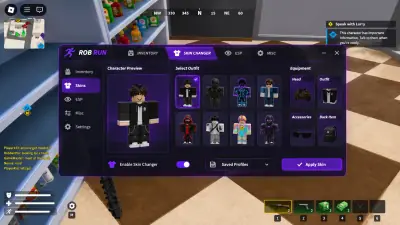
A local cosmetic preview changes what your client draws. An inventory item is something recorded as owned on an account. Those are different outcomes, and the distinction matters before buying a Skin Changer for any Roblox use. The standalone utility on this site describes local previews in supported games. It does not promise to add items to your Roblox account, and support for Run is not established.
Start with where the change exists
The Skin Changer product describes a visual change on your own display. That means the preview belongs to the active client view. It is not described as a purchase of an official cosmetic item or a transfer into an account inventory.
For example, imagine choosing a supported local appearance and then opening your account inventory. The utility’s stated scope gives you no reason to expect a new owned item there. This is a hypothetical distinction, not a report of a tested Roblox feature.
Visibility is not ownership
Seeing a look on your screen does not establish that other players see it. The utility does not promise shared visibility. It also does not create something you can list for sale, trade or transfer. Treat those as separate expectations rather than benefits hidden inside the word “skin.”
If you need an owned Roblox item, read the platform’s own item and purchase information for that item. A local preview utility is not a substitute for an official ownership record. This site does not claim to grant official Roblox cosmetic entitlements.
Closing the client changes the expectation
The utility’s local visuals disappear when its client closes. That limit matters if you expect the look to remain in later sessions or on another device. The published description does not establish permanent account changes, cloud inventory storage or automatic transfer of a cosmetic choice between devices.
Ask about the current client’s actual behaviour before choosing access. Do not infer saved presets or cross-device synchronisation from a general library description; those details are not established in the product facts used here.
Keep Run compatibility as a separate question
Even if the local-only result suits your goal, you still need a supported game. The library’s weapon finishes, outfits and knife styles describe categories across supported titles. They do not prove that Run supports those same categories through this utility.
The Run compatibility guide explains how to ask about the exact experience and desired appearance. The main Rob Run Cheats product focuses on ESP and requires a separate executor; it does not establish a cosmetic bundle.
Check the expected outcome before checkout
Write down whether you want a local look, shared visibility or an owned item. Compare that goal with the utility’s published limits. If your goal depends on inventory ownership or trading, the stated local preview function does not provide it.
For a local preview in a confirmed supported title, review the Windows requirements and current access instructions. Use the Support page to resolve game coverage and client questions before buying. A clear understanding of the result prevents a cosmetic purchase from being judged against an outcome it never promised.