
Cloud DMA
Guided Hyper-V infrastructure on one Windows PC, with encrypted activation and separate service dependencies.
In short
A Hyper-V environment on one PC
Cloud DMA installs a Hyper-V virtual environment on one Windows PC. Its guided installation and encrypted activation belong to the infrastructure service rather than to the Run script.
Overview
Cloud DMA
Check Windows, Hyper-V and the separate purchases before ordering.
Cloud DMA installs a Hyper-V virtual environment on one Windows PC. Its guided installation and encrypted activation belong to the infrastructure service rather than to the Run script.
GREENWARD, Static Server and AWS are separate required purchases in the listed setup. Check each requirement and the current checkout terms. Cloud DMA is not established as necessary for Rob Run Cheats.
Hyper-V setup on one PC
Cloud DMA provides a virtual environment on the same Windows PC. The guided installer configures Hyper-V, and service activation uses an encrypted connection. This is a single-PC infrastructure product; setups that depend on an external DMA device or a second physical computer are outside its stated scope.
What you need before checkout
The published setup requires GREENWARD, Static Server and AWS as separate purchases. Check availability and costs in their current order flows before choosing Cloud DMA access. The infrastructure license does not establish that any particular game script can use it.
Windows and hardware checks
The requirements list 64-bit Windows 10 or 11 with Hyper-V available. Pro, Enterprise or Education is recommended. CPU virtualization must be enabled in firmware. The listed memory floor is 8 GB, with 16 GB recommended, plus stable broadband and the security settings shown in the requirements. Use the Cloud DMA Hyper-V checklist to review the environment and separate services.
Keep the Run dependency separate
The Rob Run Cheats brief calls for a separate Roblox executor. It does not require Cloud DMA. If you are buying only for Run, confirm the actual need before ordering another infrastructure product. Use the Cloud DMA instructions for its environment and the Run instructions for the script. Read whether Run needs Cloud DMA before adding infrastructure to a Run setup.
Included
Cloud DMA features
The lifetime license covers the Cloud DMA infrastructure layer.
- Single-PC setup
- Guided Hyper-V installation
- Encrypted activation
- Lifetime access
Setup
From purchase to activation
Follow the Windows and Hyper-V checks before you run the installer.
Setup
- Layer A
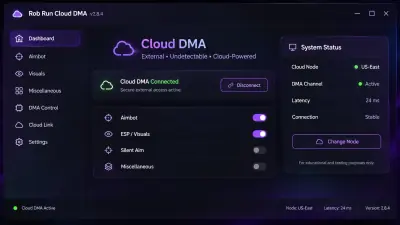
Cloud DMA dashboard artwork
Supplied illustrative dashboard showing a connection card, switches and a system-status panel.
More products
Pairs well with
Explore the other three products and their setup requirements.
- Rob Run Cheats Check current ESP coverage, access instructions and executor compatibility before choosing your Run license. View details: Rob Run Cheats
- HWID Spoofer HWID Spoofer works on the machine identifiers described in its feature list. Disk serials, MAC addresses and GPU IDs are among the fields it can change. The included cleaner handles traces as part of the documented workflow. View details: HWID Spoofer
- Skin Changer Skin Changer changes how supported cosmetics appear in your own client. Its library includes weapon finishes, outfits and knife styles for supported titles. These are visual previews rather than items added to an account. View details: Skin Changer
FAQ
Questions about this page
Answers for this page. The FAQ page holds the rest.
Blog
Related guides
Understand ESP, plan your executor checks and separate Run requirements from optional utilities.
The Run brief requires a separate executor, not Cloud DMA. Understand the infrastructure product and confirm any proposed connection before ordering it.
Check Windows edition, virtualization, memory, security settings and separate service purchases before evaluating Cloud DMA alongside Run.