
Skin Changer
Preview weapon finishes, outfits and knife styles locally in supported games. Confirm your title first.
Library
The finish library on this PC
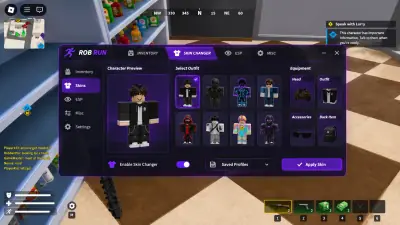
Skin Changer changes how supported cosmetics appear in your own client. Its library includes weapon finishes, outfits and knife styles for supported titles. These are visual previews rather than items added to an account.
4 cosmetic rows continue lower on this page.
Overview
Skin Changer
Where the finish is drawn, what stays out of your inventory, and how to check a title before checkout.
Skin Changer changes how supported cosmetics appear in your own client. Its library includes weapon finishes, outfits and knife styles for supported titles. These are visual previews rather than items added to an account.
Choose this product for local appearance changes only. The Run product does not list a bundled cosmetic module, and Run support for Skin Changer is not confirmed. Ask for the current game list before purchase.
What the client draws
The cosmetic library supplies local looks for supported games. Weapon finishes, character outfits and knife variants are its listed groups. Availability depends on the title and the current client. A list of cosmetic types does not establish that each type exists in Run.
Seen on your display alone
The visual change stays in your client. Your account inventory does not gain an owned item, and there is nothing to sell or trade. Other players are not expected to see the same look. Closing the client removes the local visual effect. See local previews versus Roblox inventory before expecting an owned item.
The supported list can move
Game and Windows updates can affect compatibility. Confirm the exact title and the cosmetic category you want before choosing access. Skin Changer is sold separately from Rob Run Cheats and does not provide ESP or a Roblox executor. Cosmetic software can still conflict with game rules. The Skin Changer Run compatibility checklist lists the questions to ask before buying.
PC setup for the cosmetic client
The listed utility requirements are 64-bit Windows 10 or 11 with HVCI, Core Isolation, TPM and Secure Boot enabled. Internet and the delivered client access are also required. Read current instructions for this utility; do not assume these settings are requirements for the Run script.
Groups
Cosmetic groups
These finish types are available once the cosmetic license is active.
- Presets for premium weapon finishes
- Presets for character outfits
- Presets for rare knife styles
- Coverage across major titles
- A lightweight client on this PC
- Cosmetic drawing on this screen only
- Monthly and lifetime cosmetic licenses
- Windows 10 and Windows 11 support
When access arrives
Shots, then portal access
Shot notes stay on the left side. The right side covers portal access, then how the menu is set up.
Shots
- Layer A
Skin Changer interface artwork
Supplied illustrative preview showing a character, outfit choices and equipment panels.
More products
Pairs well with
The catalog beside this cosmetic client, with a separate page for each license.
- Rob Run Cheats Check current ESP coverage, access instructions and executor compatibility before choosing your Run license. View details: Rob Run Cheats
- HWID Spoofer HWID Spoofer works on the machine identifiers described in its feature list. Disk serials, MAC addresses and GPU IDs are among the fields it can change. The included cleaner handles traces as part of the documented workflow. View details: HWID Spoofer
- Cloud DMA Cloud DMA installs a Hyper-V virtual environment on one Windows PC. Its guided installation and encrypted activation belong to the infrastructure service rather than to the Run script. View details: Cloud DMA
FAQ
Questions about this page
Answers for this page. The FAQ page holds the rest.
Blog
Related guides
Understand ESP, plan your executor checks and separate Run requirements from optional utilities.
Run compatibility is not established for the standalone Skin Changer. Ask about the exact experience, cosmetic category and current client before purchase.
Understand the difference between a local Skin Changer preview and owning an item, including visibility, trading and what remains after the client closes.